The short answer
On Shopify, a pre-order app adds a deposit to the product. At checkout the customer pays the deposit, and Shopify saves the payment method. Later the app charges the balance to that payment method.
What is a pre-order deposit?
A pre-order deposit is a partial payment. The customer pays part of the price now, for a product that is not in stock yet. The order stays open with a balance. The balance is the amount that the customer did not pay at checkout.
Some apps call it a partial payment or a down payment. It is the same thing: one order, two payments.
Why take a deposit instead of the full price
- The amount at checkout is lower, so a customer who is not sure can still order.
- You get money before you pay your supplier or start production.
- You see real demand. A paid deposit tells you more than a sign-up form.
- You hold less money that you must refund if the product is late.
When the balance is charged
You choose one of three times for each pre-order:
- When you fulfill the order. Kaparo charges the balance when you mark the order as fulfilled in Shopify. A pre-order waits on hold until then: click Mark ready to ship before you fulfill it.
- On a date. For example, the week before the product arrives.
- Some days after checkout. For example, 30 days.
Kaparo charges the payment method that the customer used at checkout. The customer does not need to come back to your store. If the card is declined, Kaparo tries again and emails you. When the bank asks the customer to confirm the payment, Kaparo sends them Shopify's invoice with a payment link. You can also send that link yourself.
How to set up a deposit pre-order in Kaparo
The same four steps are on Home in the app:
- Choose a plan. Choose a plan on the Billing page. You can then use all pages of Kaparo.
- Choose a product. Choose the product. Then set the deposit.
- Add the Pre-order button to your theme. Open the theme editor. Then click Save. If the button is not near the buy buttons, the Guide page tells you how to move it.
- Test a pre-order. Place a pre-order on the product page of your store. Kaparo marks this step as done when the order comes in.
The guide has each step in full, with a video.
What your customer sees
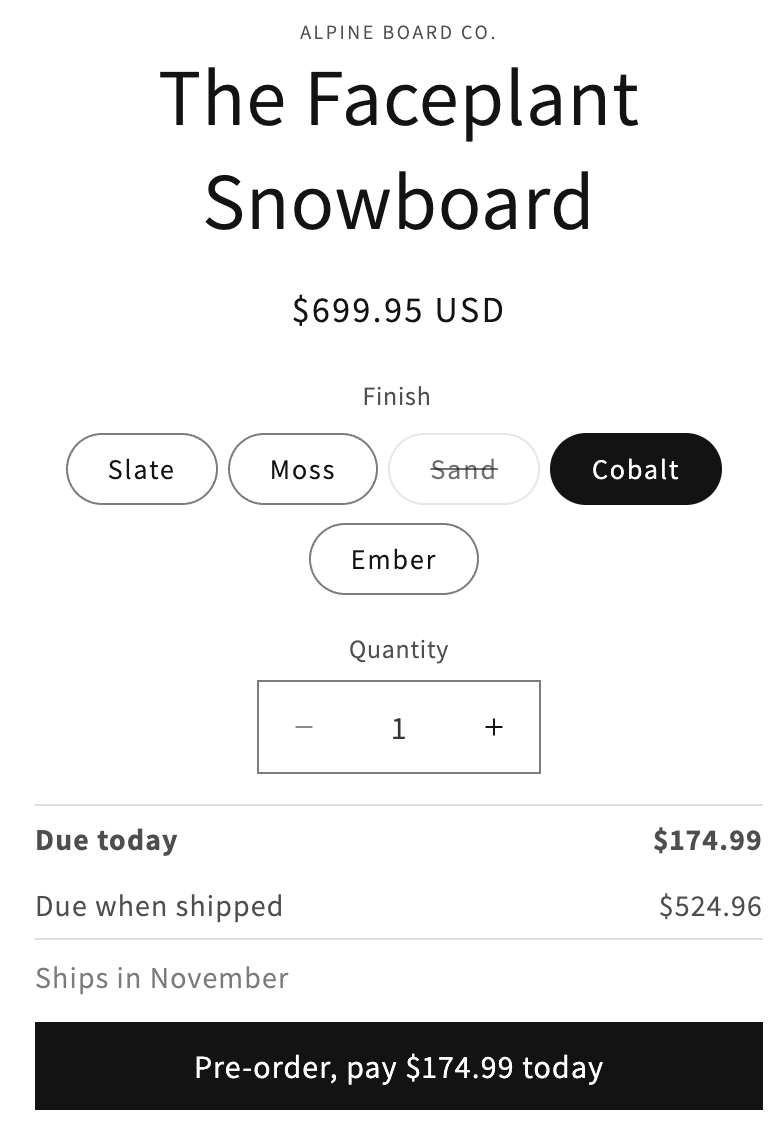
The product page shows what is due today and what is due when the order ships, as in the picture at the top. Checkout shows the deposit as the amount to pay now.
In Kaparo, the Orders page shows the deposit, the balance and the status of each order.

How much deposit to ask for
There is no fixed rule. Choose an amount that covers your first costs, such as materials or your supplier's deposit. A higher deposit makes a cancel less likely. A lower deposit asks less of a new customer.
You can set a different deposit for each product. You can also take the full price at checkout and sell the product as a pre-order with no balance.
Things to know before you start
- An order has one balance date. When a cart has pre-orders with different dates, Shopify uses the earliest date. A balance due on fulfillment comes before any date. The customer pays all deposits at checkout.
- Shopify takes pre-orders and deposits only through Shopify Payments, PayPal Express, Adyen on Shopify, or Stripe where Shopify offers it. Local payment methods, Shop Pay, Apple Pay and Google Pay aren't offered at a pre-order checkout.
- Pre-orders work at the online store checkout only. Shopify doesn't offer them in Shopify POS or on draft orders.
- When you cancel an order in Shopify, Kaparo charges no balance on it. If a charge was already running at that time, Kaparo emails you so that you can refund it.
- Kaparo adds nothing to your theme code. The button is an app block that you add in the theme editor.
Questions merchants ask
Can I take a deposit on Shopify without an app?
Not at checkout. Shopify takes a deposit at checkout only through a pre-order app from the Shopify App Store. The app adds the deposit to the product with Shopify's purchase options.
Is a pre-order deposit the same as a partial payment?
Yes. In both, the customer pays part of the price at checkout and the rest later, on the same order.
Does Kaparo take a fee for each order?
No. Each plan has a fixed monthly price, and there is a Free plan. Kaparo never takes a part of your sales.
What if a customer cancels?
Cancel the order in Shopify and refund the deposit there. Kaparo sees the cancel and charges no balance.
Can I sell one variant as a pre-order and the others from stock?
Yes. Set the pre-order on one variant. Its other variants sell as usual.
Who can I ask?
Email support@kaparo.app. A person answers.