The pre-order app for Shopify
Take a deposit today. Charge the balance when it ships.
Sell pre-orders and made-to-order products with a deposit at checkout. Kaparo charges the rest to the same card when you ship.
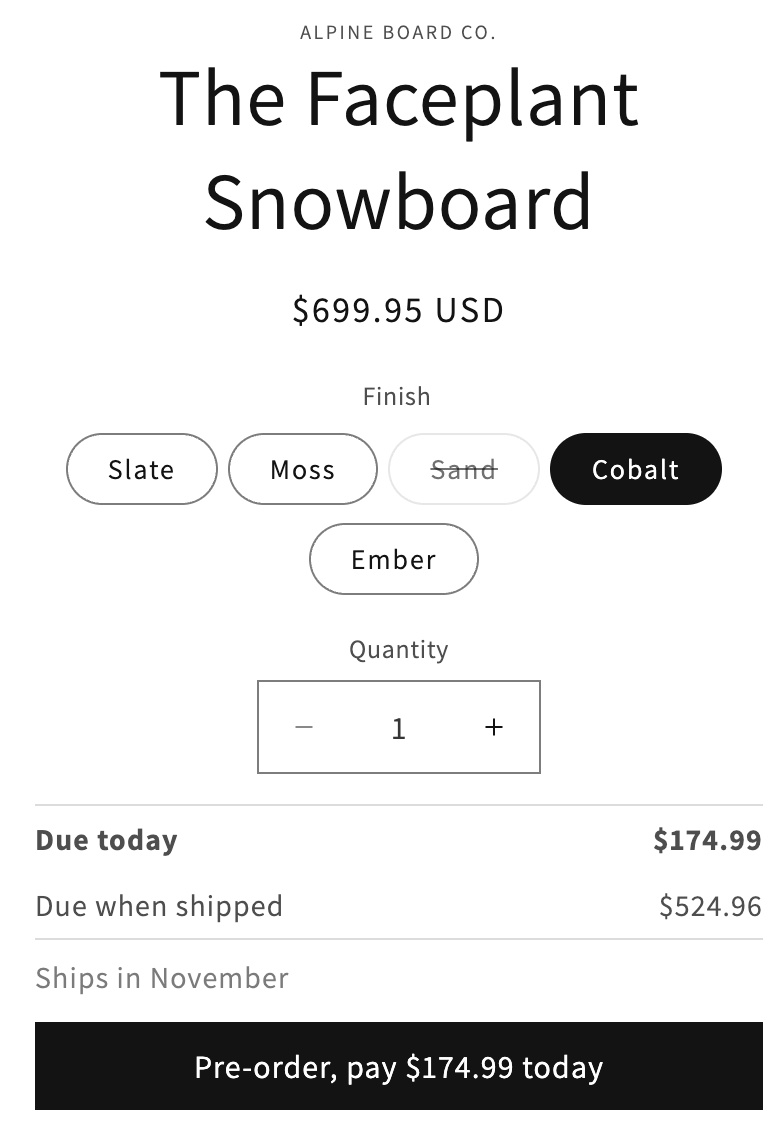
What Kaparo does for you
Take a deposit at checkout
Set a percentage or a fixed amount. Shoppers see what they pay today and what's left, on the product page and in Shopify's checkout. You set it per variant, so the ones in stock still sell as normal.

Tell customers before you charge
Kaparo emails the customer before the balance is charged, from your own domain once you've verified it. No surprise charges.

Charge the balance when you ship
Kaparo charges the same card when the order ships. You can also pick a date, or a number of days after checkout. Every pre-order is in one list with its status.

Recover failed payments
If a card is declined, Kaparo retries it and shows you why. You can send a payment link, or mark the balance as collected when the customer pays in person or by bank transfer.

Set up in minutes
- Step 1
Install Kaparo
From the Shopify App Store. The first 30 days are free.
- Step 2
Set the deposit
Pick a product or a variant, then choose a percentage or a fixed amount.
- Step 3
Add the block
Place the pre-order block on your product page in the theme editor.
Flat monthly pricing
No per-order fees. 30-day free trial on every plan.
- Starter$29For up to $5,000 of deposits and balances a month
- Growth$59For up to $20,000 a month
- Pro$99No monthly limit, priority support
- Per order$0On every plan
Common questions
Is there a fee per order?
No. Kaparo is a fixed monthly price. Your plan depends on how much you take in deposits and balances a month.
Do I need to change my theme's code?
No. You add the pre-order block in the theme editor, and remove it the same way.
When is the balance charged?
When the order ships, on a date you set, or a number of days after checkout. Kaparo emails the customer first, unless you switch that email off.
What if the customer's card is declined?
Kaparo retries and shows you the reason. You can send a payment link, or mark the balance as collected if they pay another way.
Start taking deposits on your pre-orders
Start your 30-day free trialRefunds
If Kaparo isn't working out, email us and we'll refund your most recent monthly charge. No questions, no form. Refunds for a yearly plan are pro-rated to the months you haven't used. Ask within 30 days of the charge.
Support
Email support@kaparo.app. A person replies within 24 hours on weekdays.
For agencies
We set Kaparo up on one of your client's stores, on a call with you, at no charge. You get a case study for your site, and we publish it too. Nothing is paid either way.